Apple’s 16-inch MacBook Pro has been my notebook of choice in recent years, but it isn’t perfect, and that led me to check out the competition — namely, Acer’s $2,000 Predator Helios Neo 14 AI laptop.
My current notebook is an M4 Pro 16-inch MacBook Pro, and that replaced my M1 Pro 16-inch MacBook Pro after it took an unfortunate tumble from a table. As you might expect, I’m very comfortable with macOS, and switching to Windows full-time isn’t in the cards.
But that doesn’t mean that there isn’t room for a Windows PC in my life. Because as much as Apple might try to tell you otherwise, Mac gaming just doesn’t quite cut it.
Which brings me to the Acer Predator Helios Neo 14, a notebook that has a lot to offer. It has a chip to rival Apple’s, more RAM, and more storage, so it’s no slouch.
But most importantly, it has one of Nvidia’s latest generation GPUs. Its GeForce 5070 is the main reason I wanted to try this notebook out, but the overall package makes it a real MacBook Pro competitor.
So, with that in mind, I spent the last few weeks using the two machines side-by-side.
I wanted to see how the other half lives. Spoiler: it turns out they live pretty well.
Apple 16-inch MacBook Pro vs Acer Helios Neo 14: Hardware specs
We have to start somewhere, and the most obvious place to start seems to be cold, hard specifications.
My M4 Pro MacBook Pro is the entry-level 16-inch model that retails for $2,499. For the comparison, the as-tested Predator Helios Neo 14, runs around $2,000.
| Specifications | M4 Pro MacBook Pro (16-inch, 2024) | Acer Predator Helios Neo 14 |
|---|---|---|
| Starting Price | $2,499 Check best price |
$1,905 Buy on sale at Amazon |
| Dimensions (inches) | 14.01 x 9.77 x 0.66 | 12.76 x 10.03 x 0.82 |
| Weight (pounds) | 4.7 | 4.2 |
| Display | 16.2-inch Liquid Retina XDR, Wide Color (P3) True Tone ProMotion, Nano-texture (optional) |
14.5-inch OLED, CineCrystal LED 120Hz |
| Resolution | 3,456 x 2,234 | 2,880 x 1,800 |
| Brightness | 1,000 nits sustained fullscreen, 1,600 nits peak HDR, 600 nits SDR |
400 nits sustained fullscreen |
| Processor | Apple M4 Pro 14-core | Intel Core Ultra 9 285H 16-core |
| Graphics | 20-core GPU | Nvidia GeForce RTX 5070 8GB |
| Memory | 24GB | 32GB |
| Storage | 512GB | 2TB |
| Battery | Lithium-polymer | Lithium Ion (Li-Ion) |
| Networking | 802.11ax Wi-Fi 6E Bluetooth 5.3 |
802.11ax Wi-Fi 6E Bluetooth 5.3 |
| Touch ID | Yes | No |
| Camera | 12MP Center Stage camera with Desk View | 1080p webcam |
| Audio | Six-speaker sound system, Force-cancelling woofers, Three-mic array with directional beamforming and high signal-to-noise ratio, Headphone jack with high-impedance headphone support, Dolby Atmos support with Spatial Audio |
Two-speaker sound system, Headphone jack |
| Ports | Three Thunderbolt 5 ports, SDXC Card Slot HDMI 3.5mm headphone, MagSafe 3 |
Two USB-C ports (1x Thunderbolt 4,) Two USB-A ports microSD card reader HDMI 3.5mm headphone/microphone, Charging port |
Apple 16-inch MacBook Pro
This machine has a 16-inch Liquid Retina XDR display with a resolution of 3,456 by 2,234 pixels. It has a peak SDR brightness of 1,000 nits and a peak HDR brightness of 1,600 nits.
That display also supports a super-fast 120Hz variable refresh rate as well as P3 Wide Color. Apple’s displays also offer True Tone, a feature that adjusts the color and intensity to match the ambient light.
As for the underlying technology, Apple uses a mini-LED display, and it’s stunning. You’ll be hard-pressed to find a better notebook display today.
Atop that display is a 12-megapixel Center Stage camera with support for 1080p video. Audio is handled by a stellar six-speaker sound system, while a 3.5mm headphone port is also offered.
Unlike other notebooks, the MacBook Pro can detect the impedance of your headphones and adapt accordingly. That means even professional headphones, which normally require a dedicated amp, will work just fine.
On the inside, the M4 Pro chip comprises a 14-core CPU and a 20-core GPU. That chip is paired with 24GB of unified memory and a 512GB SSD, but models with more memory and storage are available if you need them.
By using unified memory, the MacBook Pro shares its 24GB pool across both CPU and GPU-based tasks. It adds flexibility, allowing more memory to be used wherever it’s needed most.
Having every component use the same memory means there is no need to move data during heavy workloads. It can also provide performance benefits thanks to the reduced latency.
In terms of connectivity, the MacBook Pro supports Wi-Fi 6E wireless networking as well as Bluetooth 5.3. There are three Thunderbolt 5/USB4 ports, an HDMI port, a 3.5mm headphone port, and an SDXC card slot to round things out.
Being a big notebook, the 16-inch MacBook Pro has plenty of room for a nice, chunky 100-watt-hour battery. The result is a claimed 24 hours of video streaming per charge.
Buyers can choose between Space Black and Silver colors when ordering.
Acer Predator Helios Neo 14
Acer’s Predator Helios Neo 14, as the name suggests, has a smaller display at 14.5 inches. It sports a 2,880 x 1,800-pixel resolution and has a fast 120Hz refresh rate.
This display is a stunner thanks to its use of OLED technology. A 400-nit peak brightness and 100% DCI-P3 color support round out the main display specs.
The Neo 14 comes with a built-in 1080p webcam with Windows Hello biometric support.
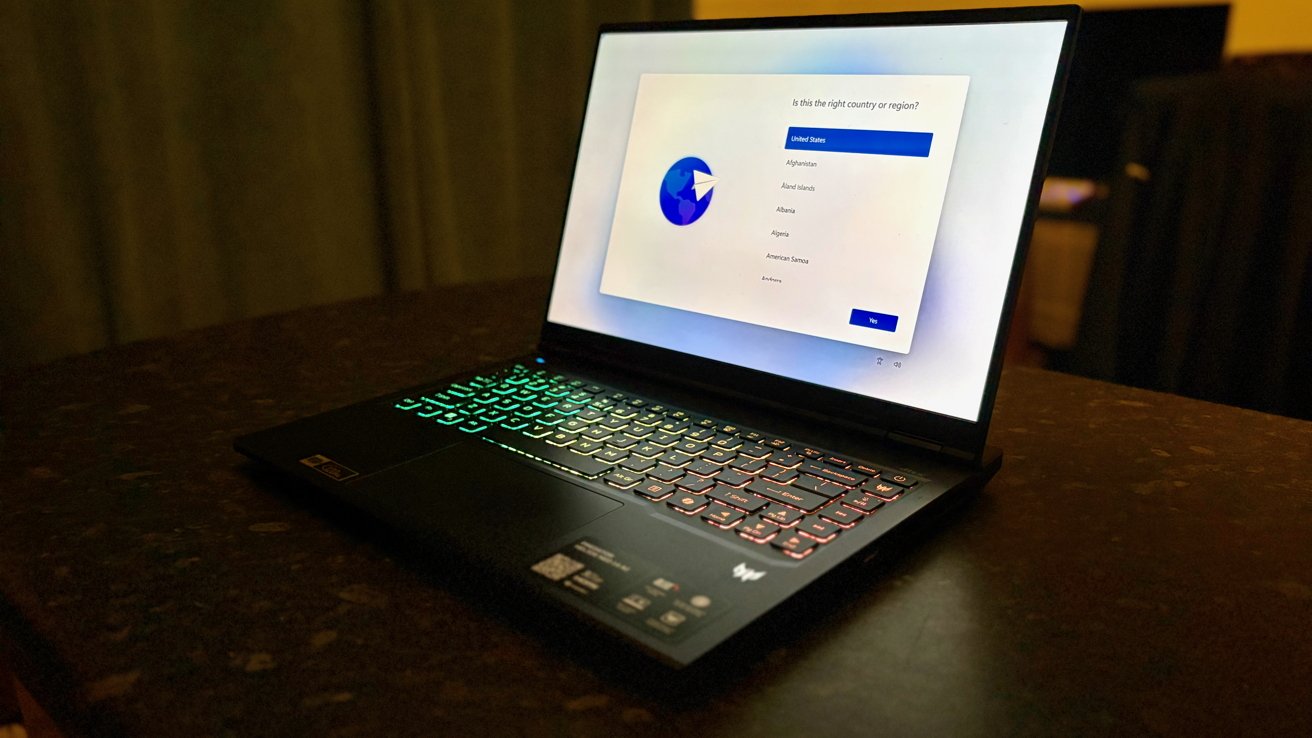
Apple 16-inch MacBook Pro vs Acer Helios Neo 14: The Neo 14 looks best with the lights turned down and the RGB turned up
Inside, the model I’ve been testing has an Intel Core Ultra 9 285H chip, which is the top-of-the-line. It has 16 cores, so it’s perfect for multi-threaded workloads.
That chip is matched with 32GB of LPDDR5X RAM and a 2TB SSD. Then there’s the GPU.
This machine is clearly aimed at gamers thanks to the inclusion of an Nvidia GeForce RTX 5070 GPU, which has 8GB of dedicated memory to call its own. No sharing here.
On the connectivity side, Wi-Fi 6E is present and correct, as is Bluetooth 5.3 for connecting all of your accessories.
On the wired front, there’s a lot going on here. There are three USB 3.2 x 2 ports and two Thunderbolt 4 ports. Headphone users also get a 3.5mm jack.
Sound is handled by a quad-speaker system rated for DTS:X Ultra audio. And buyers can choose any color they like so long as it’s black.
The comparison
There is no denying that neither of these machines is the budget option. They’re expensive notebooks with specifications to match.
Apart from the different display sizes, there are two main differences I want to note.
The first is the refresh rate. While both notebooks top out at 120Hz, the MacBook Pro can adjust its refresh rate to best suit the content on show.
By contrast, the Neo 14 doesn’t have a variable refresh rate. That means it’s locked at either 120Hz or 60Hz, and you can choose between the two yourself.
The other difference is peak brightness. The MacBook Pro is just so, so bright, and it’s easy to take that for granted. If you use your notebook outside during the day, you’ll really appreciate how bright the MacBook Pro can get.
On the inside, the two machines have very similar amounts of RAM, but the Windows machine has four times as much storage. Given the similar price, that’s impressive and vital when it comes time to install all of your favorite games.
The Intel Core Ultra 9 chip at the heart of the Neo 14 is incredibly fast, as is the M4 Pro. I’ve never used a Windows PC that’s come close to this one in terms of performance.
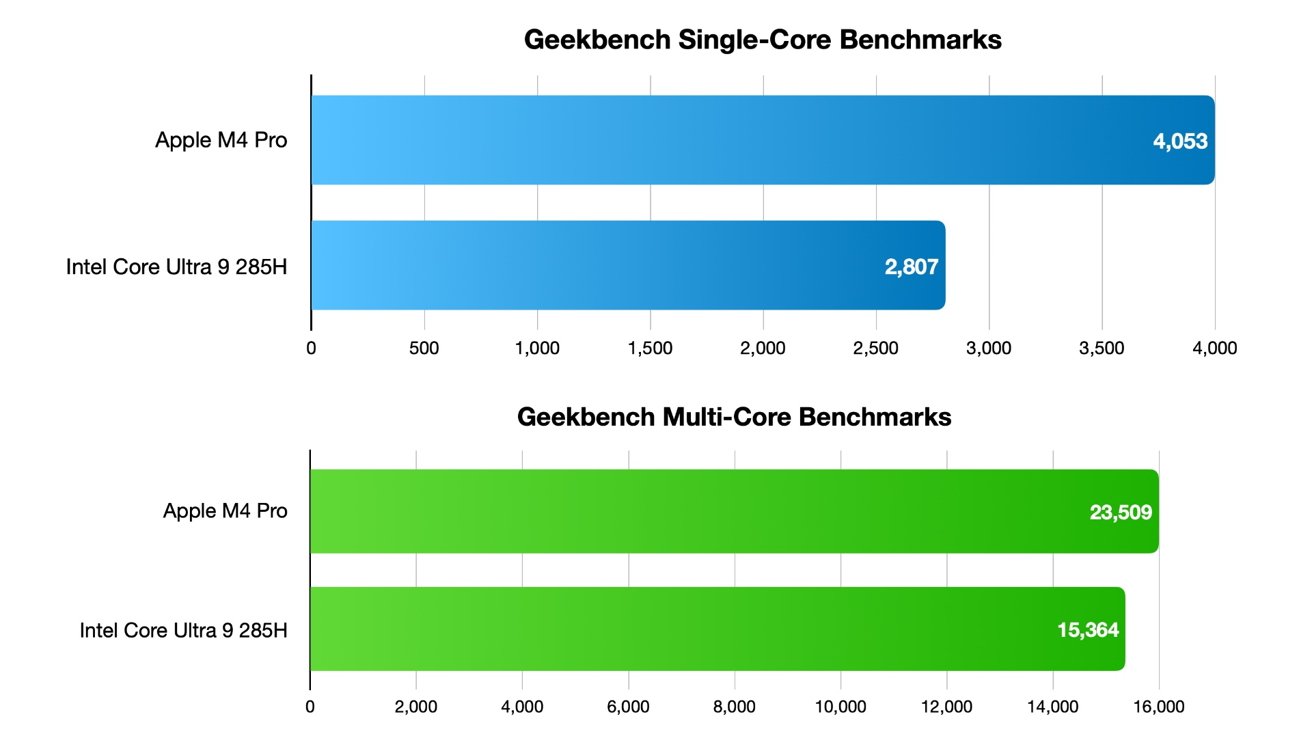
Apple 16-inch MacBook Pro vs Acer Helios Neo 14: Intel’s chip is a powerhouse and a perfect companion for the Nvidia GPU
That CPU really is the perfect companion for the GPU, that GeForce RTX 5070 from Nvidia. It’s the GPU that made this laptop so interesting to me, and it hasn’t disappointed. More on that later.
Rounding things out, both machines have backlit keyboards with the Neo 14 sporting RGB lighting throughout. They both have large trackpads, although Apple’s remains a joy to use and is my favorite of the two.
The Neo 14 doesn’t have Thunderbolt 5, but does offer Thunderbolt 4. It also lacks a memory card slot.
Apple 16-inch MacBook Pro vs Acer Helios Neo 14: Software
Perhaps the biggest difference between these two machines is their software. The M4 Pro MacBook Pro runs macOS, in this case macOS Tahoe. The Neo 14 ships with Windows 11 Home preinstalled.
Before the Neo 14 arrived, it had been a number of years since I spent any meaningful time with Windows. I don’t think I’d ever used Windows 11.
You might expect me to now wax poetic about how poor Windows 11 is, and how it’s a poor imitation of the macOS that I use every day. And in some situations, it probably is.
But, in reality, Windows 11 is fine. I was surprised by how many features were where I expected them to be, and they largely worked the way I’d have hoped, too.
But it’s fair to say that the Windows Settings app has perhaps paid a little too much attention to the Mac. Everything’s there, it just takes far too many clicks to find it.
On a positive note, everything is at least there. The same can’t always be said about System Settings on my Mac.
I spent most of my time using the Neo 14 as a gaming machine. That’s likely to be the reason most buyers pick one up — I don’t expect to see many of these things on boardroom tables, pulsing RGB and all.
Outside of playing games, many of the apps I use every day have Windows versions. At the very least, they have alternatives that work in much the same way.
As I type this in 2026, so many of the apps we all use aren’t apps at all, they’re websites.
That fact wasn’t lost on me when I first opened Edge, Microsoft’s built-in replacement for Explorer. I quickly downloaded Chrome and closed Edge before it could sell me some Microsoft AI tool or app.
Chrome is fine, but it isn’t Safari. There is an iCloud app that can be used to sync all of your bookmarks, passwords, etc., to a Windows PC, but I still missed Safari.
There’s muscle memory that can’t be ignored, and the same goes for the missing Safari Extensions that I rely on.
The (un)necessary cruft
The Neo 14 comes with some preinstalled software that I’d recommend immediately removing unless you need it. But there’s one app you can’t really avoid: the Predator app.
This is where all of the controls that Apple doesn’t let you see can be found. There are controls for how the RGB lighting works, how fast the fans spin, and more.
But the important stuff comes in the form of profiles. There are profiles for gaming and running the notebook as coolly and quietly as possible.
And then there’s the all-out “to hell with my ears” profile. And it’s glorious.
This profile turns everything up to 11, then finds a 12 and a 13 beyond that. I’ve never experienced anything like it.
In this mode, the CPU and GPU run at full pelt, with all the reins off. But to do that, the fans also run at pretty much the same all-out levels of crazy.
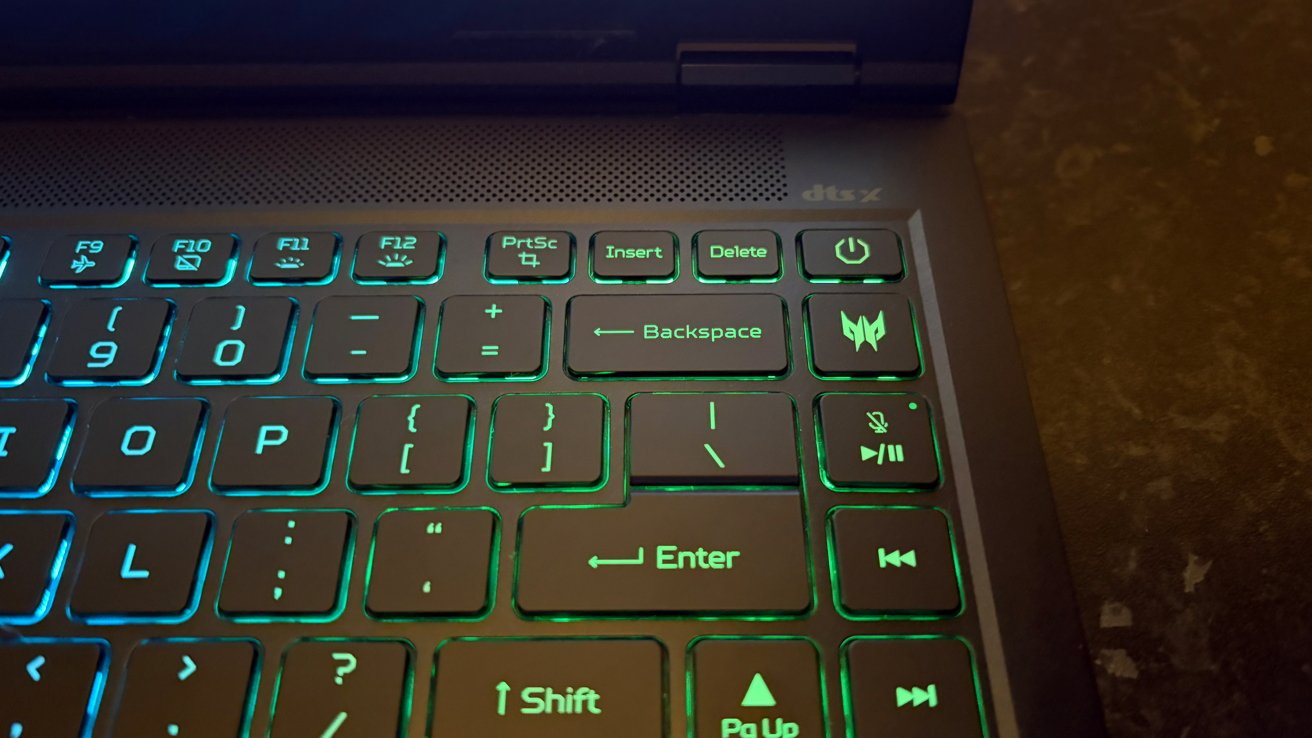
Apple 16-inch MacBook Pro vs Acer Helios Neo 14: A special Predator button opens a world of configuration options
You’ve probably seen fan noise compared to the sound of a jet engine before. And the writer was, obviously, being a bit dramatic. Unless they had a Predator Neo 14 on their desk.
In fairness, I’m not really comparing the fan noise to that of a jet engine; that would be silly. Because it’s louder.
It’s impossible to really drive home the point, and capturing a video of the phenomenon doesn’t do it justice. Instead, I’ll give a real scenario as an idea to go by.
Picture the scene, if you will. It’s 1 A.M., and I’m deep in an Arc Raiders hole.
I should have been in bed hours ago, like the rest of the household. But it’s OK, I’m downstairs with a headset on. I’m silent, like a game-playing ninja.
Then I took the headset off and realized I had probably woken people three doors down the street. I turned it off and went to bed.
It’s loud. I’d certainly recommend spending most of your time in the more ear-friendly profiles, ramping things up only when the most GPU-hungry games demand it.
All of that said, my time with the Neo 14 left me with the knowledge that I could use a Windows machine if I had to. I wouldn’t enjoy it, but it could be done.
But all of the Windows oddness was forgiven as soon as I opened Steam.
Apple 16-inch MacBook Pro vs Acer Helios Neo 14: Design
Apart from the fact that one runs Windows and the other macOS, the biggest difference between these notebooks might be their design.
Apple has spent years perfecting its metal aesthetic, with a large keyboard sunk into its chassis. The MacBook Pro looks every bit the premium notebook, and it feels like one, too.
Just heavy enough without being too heavy, it doesn’t bend or flex. The huge slab of glass that covers the display goes edge-to-edge and houses a camera and other sensors in its notch.
By contrast, Acer has gone a different route with the Helios Neo 14. A very different route indeed.
Once your eyes have adjusted to the RGB lighting on the lid and keyboard, you’ll notice the sub-premium look and feel.
There’s a metal chassis, but something feels off. A flimsiness that’s hard to pinpoint.
The display is also set slightly forward from the back edge of the notebook, creating a sort of rear end that juts out. It’s to give the notebook more room to breathe, with giant vents designed to expel heat as quickly and efficiently as possible.
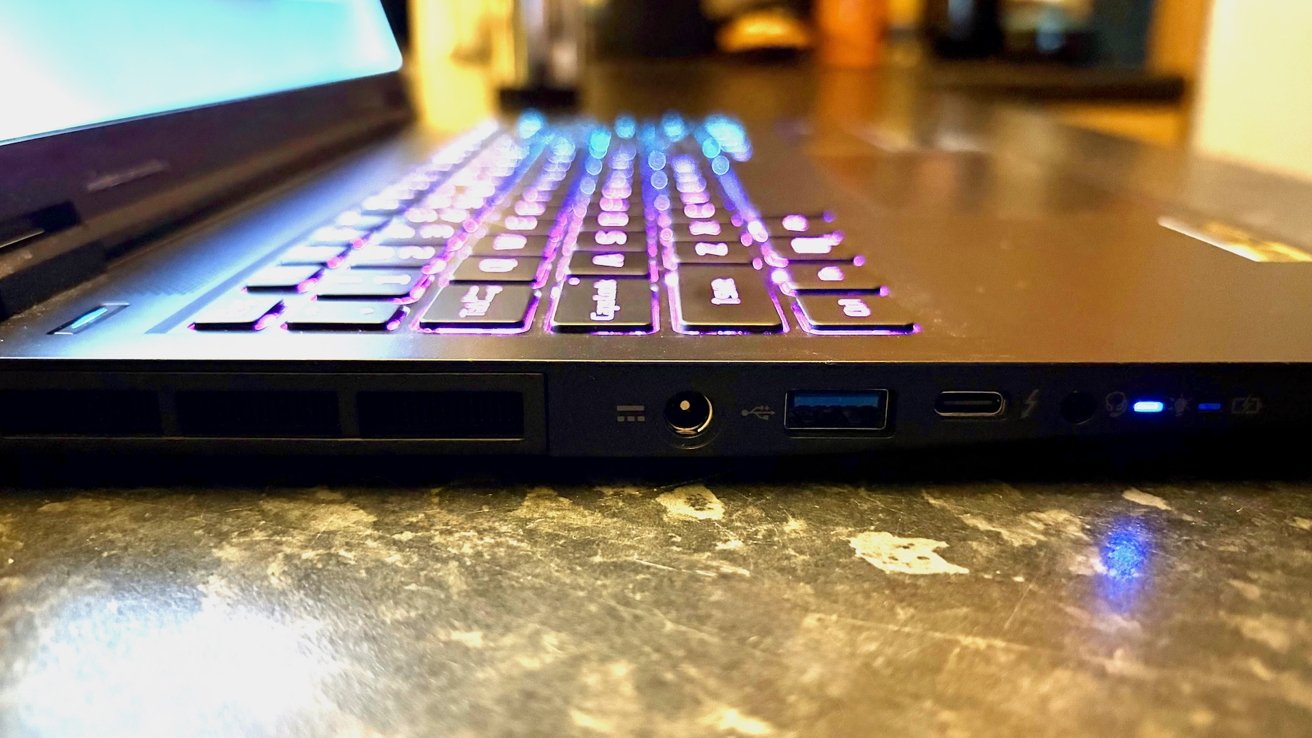
Apple 16-inch MacBook Pro vs Acer Helios Neo 14: Acer’s notebook is so powerful that it needs a dedicated charging cable and connector
That’s a byproduct of the high-powered Intel chip and greedy GeForce RTX 5070 GPU, but it’s ugly. It’ll be a worthwhile trade-off to some, but I can’t help but think there has to be a better way.
Another thing you’ll notice is all of the ports down each side of the notebook. Ports, within reason, are good. They offer flexibility.
But after years of notebooks reducing the number of ports, it gives the Neo 14 the look of a machine much older than its years. I almost expect to see a Serial port somewhere.
Speaking of ports, while the Neo 14 can charge via USB-C, it really wants more power than that. To that end, there’s a barrel port on the left-hand side like the notebooks of the 1990s.
This, again, is a necessity brought about by the high-spec internals. Run that Intel chip and Nvidia GPU at full speed, and USB-C just won’t cut it, hence the barrel connector.
Aesthetics aside, that also means that you can’t connect this thing to a USB-C monitor or dock and live that sweet one-cable lifestyle. You’ll need to plug in the power cable, too.
It isn’t a showstopper, to be sure. But it’s just another winkle that reminds you what the Neo 14 is — a notebook that offers power above all else, even if it means compromising elsewhere to make it happen.
Thankfully, it’s all worth it when you let the Neo 14 stretch its legs a bit.
Apple 16-inch MacBook Pro vs Acer Helios Neo 14: Gaming
Apple has tried to convince the world that it’s serious about gaming. It’s created entire macOS frameworks for it, making it easier for developers to port their games from Windows. But none of it really works.
I’ll admit that there are tons of games for the Mac. The App Store has plenty, and Apple Arcade is hard to beat in terms of value.
But if you’re someone who wants to play the latest games, the day they come out, you need a Windows PC.
It isn’t that I’m comparing the Helios with an old Intel MacBook Air, either. As mentioned, I’m using an M4 Pro with more cores than an orchard. It’s quick.
But it’s no match for the kinds of GPUs gamers demand. It’s certainly no match for the GeForce RTX 5070.
Plucking two random machines from Geekbench’s extensive catalog of tests, we get a picture. An Nvidia GeForce RTX 5070 manages an OpenCL score that’s 207% of that managed by an Apple M4 Pro.
But performance is just part of the story.
Open Steam and you’ll find plenty of games that work with macOS. But it’s a drop in the ocean when you remember every game of consequence in the Steam store works on Windows.
Thanks to the Steam Deck, there are more that work on Linux than on macOS.
So, with my MacBook Pro tucked up for the night, I’ve been using the Neo 14 to play games. And my, is it good at doing it.
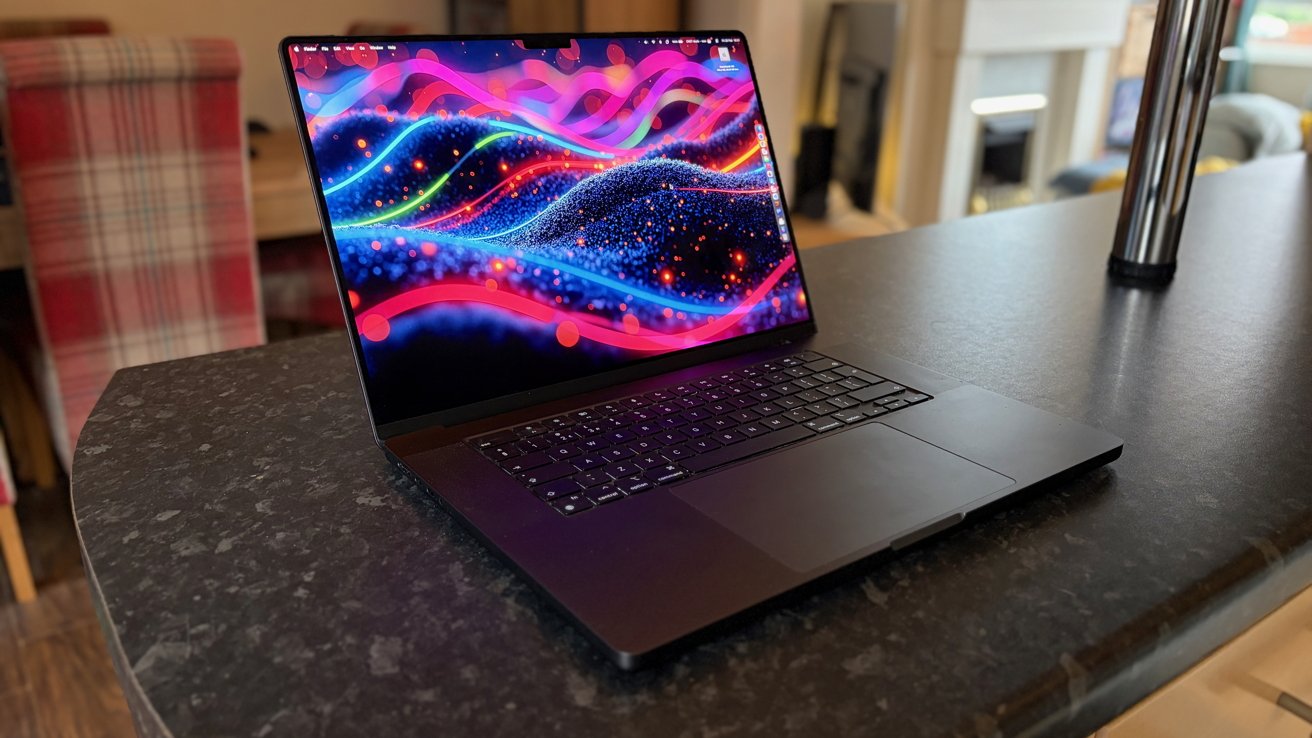
Apple 16-inch MacBook Pro vs Acer Helios Neo 14: The MacBook Pro features a clean, iconic design
I was playing PC games long before I ever touched an Apple device, let alone started writing about them. But it’s also a long time since I used a PC built with games at the forefront of its design.
After spending some time with a notebook that could play anything I cared to throw at it, I’ve learned one thing. As powerful as Apple Silicon might be, it’s nowhere near competing with Nvidia’s latest gaming GPUs.
Whether playing on the built-in display or using an external ultrawide 5K monitor, the Neo 14 has been a revelation.
I played Arc Raiders with maxed-out graphics settings. I played everything, in fact, with maxed-out graphics settings.
The notebook didn’t skip a beat, bar the incredibly loud fans, of course.
Being able to pick a game, any game, and play it is the kind of thing that draws people to console gaming. Being able to do the same thing with a laptop is the kind of amazing that I don’t think will ever get old.
I just wish I could do it on the MacBook Pro I spend my days with. And as much as Apple likes to make the right noises about its gaming tools come WWDC time each year, that’s never felt further away from happening.
Apple 16-inch MacBook Pro vs Acer Helios Neo 14: The one to buy
Normally, when we get to the end of these kinds of pieces, we make a recommendation. We recommend which of the two products you should choose to spend your hard-earned money on.
But this piece is different. You’ve already made your mind up, you’re reading this on a website dedicated to Apple and adjacent technology.
You probably already own a MacBook Pro or a MacBook Air.
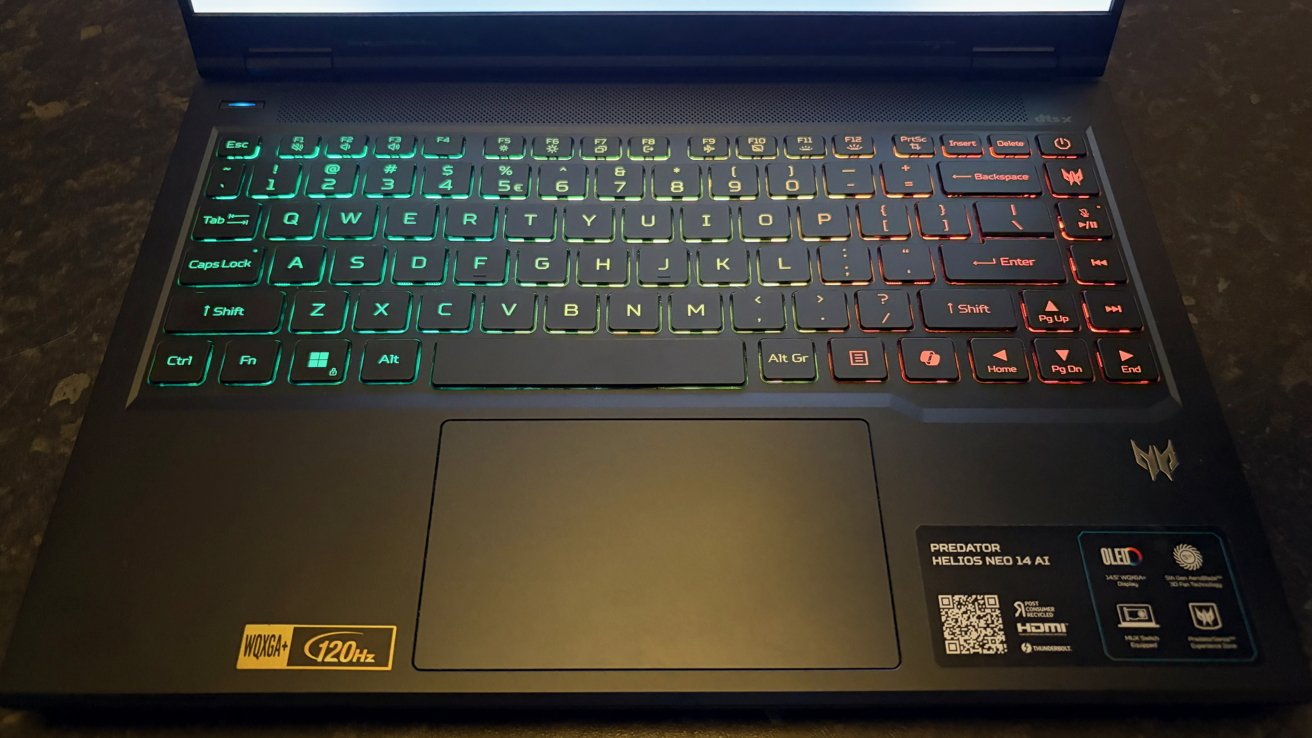
Apple 16-inch MacBook Pro vs Acer Helios Neo 14: Not all backlit keyboards are the same, and Acer’s is more colorful than some
But if you’re a gamer who wants to play games on a notebook, neither of those laptops will really cut it. They’ll play games, sure. Some games, at least.
Yes, you’ll be able to download games from Apple Arcade, and they’ll work just fine. But if you head into the section of the App Store dedicated to paid-for games, it’s a different matter entirely.
Go a step further and download Steam, and all bets are off. There’s no guarantee the game you want will work on a Mac, and it probably won’t.
But if it will, and it’s a premium title from a big-name publisher, you shouldn’t buy it. Because you won’t get the kind of experience you’re hoping for.
Ultimately, I don’t have a good answer for that. I have a bad one, and it involves buying a MacBook Air and a gaming notebook like the Helios 14.
And the fact that I’m using a $2,500 MacBook Pro and still might need to buy another notebook to play games is a sorry state of affairs.
Where to buy the MacBook Pro and Acer Predator Helios Neo 14
Retail prices for Apple’s 16-inch MacBook Pro start at $2,499, but it is often on sale for less than that. Check out our 16-inch MacBook Pro Price Guide to find the best online deals.
Prices on the Acer notebook can vary depending on which configuration you choose. The same notebook, but with 1TB of storage, is available for $1,905 currently.